easyidp.roi.ROI
- class easyidp.roi.ROI(target_path=None, **kwargs)
A Region of Interest (ROI) object, can be either 2D or 3D, often read from shp file.
- __init__(target_path=None, **kwargs)
The method to initialize the ROI class
- パラメータ:
target_path (str | pathlib.Path, optional) -- the path to roi file, often is shp file path, by default None
サンプル
>>> import easyidp as idp
>>> test_data = idp.data.TestData()

>>> roi = idp.ROI(test_data.shp.lotus_shp, name_field=0)
[shp][proj] Use projection [WGS 84] for loaded shapefile [lotus_plots.shp]
Read shapefile [lotus_plots.shp]: 100%|███████████| 112/112 [00:00<00:00, 2559.70it/s]

>>> roi
<easyidp.ROI> with 112 items
[0]     N1W1
array([[139.54052962,  35.73475194],
       [139.54055106,  35.73475596],
       [139.54055592,  35.73473843],
       [139.54053438,  35.73473446],
       [139.54052962,  35.73475194]])
[1]     N1W2
array([[139.54053488,  35.73473289],
       [139.54055632,  35.73473691],
       [139.54056118,  35.73471937],
       [139.54053963,  35.73471541],
       [139.54053488,  35.73473289]])
...
[110]   S4E6
array([[139.54090456,  35.73453742],
       [139.540926  ,  35.73454144],
       [139.54093086,  35.7345239 ],
       [139.54090932,  35.73451994],
       [139.54090456,  35.73453742]])
[111]   S4E7
array([[139.54090986,  35.73451856],
       [139.54093129,  35.73452258],
       [139.54093616,  35.73450504],
       [139.54091461,  35.73450107],
       [139.54090986,  35.73451856]])
Methods
__init__([target_path])The method to initialize the ROI class
back2raw(recons, **kwargs)Projects several GIS coordintates ROIs (polygons) to all images
change_crs(target_crs)Change the geo coordinates of roi to another crs.
crop(target[, save_folder])Crop several ROIs from the geotiff by given <ROI> object with several polygons and polygon names
get_z_from_dsm(dsm[, mode, kernel, buffer, ...])Get the z values (heights) from DSM for 2D polygon
get_z_from_pcd(pcd[, mode, kernel, buffer, ...])Get the z values (heights) from PointCloud for 2D polygon
is_geo()Returns True if the ROI is geo coordinate.
open(target_path, **kwargs)An advanced wrapper to open ROI without dealing with file format, current support shapefile.shp and labelme.json
read_labelme_json(json_path)read roi from labelme marked json file
read_shp(shp_path[, shp_proj, name_field, ...])read ROI from shp file
read_geojson(geojson_path[, name_field, ...])read ROI from geojson file
show_shp_field([encoding])Show attributes table of the source shapefile.
save(target_path, **kwargs)Save ROI to file.
save_shp(shp_path[, name_field, encoding, ...])Save ROI polygons to shapefile.
Attributes
- back2raw(recons: Recons, **kwargs)
Projects several GIS coordintates ROIs (polygons) to all images
- パラメータ:
recons (easyidp.reconstruct.Recons) -- the reconstruction object like <easyidp.Metashape> or <easyidp.Pix4D> object (support both)
roi (easyidp.ROI | dict) -- the <ROI> object created by easyidp.ROI() or dictionary
save_folder (str, optional) -- the folder to save projected preview images and json files, by default ""
distortion_correct (bool, optional) --
Whether do distortion correction, by default True (back to raw image with lens distortion);If back to software corrected images without len distortion, set it to False.(Pix4D support do this operation, seems metashape not supported yet.)ignore (str | None, optional) --
Whether tolerate small parts outside image, check
easyidp.reconstruct.Sensor.in_img_boundary()for more details.None: strickly in image area;x: only y (vertical) in image area, x can outside image;y: only x (horizontal) in image area, y can outside image.
log (bool, optional) -- whether print log for debugging, by default False
- 戻り値:
out_dict -- The 2-layer dictionary, the first layer is the roi id, the second layer is the image names contains each roi (
out_dict['roi_id']['image_name'])>>> out_dict = roi.back2raw(...) # find all available images with specified roi (plot), e.g. roi named 'N1W1': >>> one_roi_dict = out_dict['N1W1'] # roi id {'IMG_3457': ..., 'IMG_3458': ..., ...} # find the sepecific roi on specific image, e.g. roi named 'N1W1' on image 'IMG_3457': >>> one_roi_one_img_coord = out_dict["N1W1']['IMG_3457'] array([[ 43.9388228 , 1247.0474214 ], [ 69.04076173, 972.90860296], [ 353.26968458, 993.31308291], [ 328.12327606, 1267.41006845], [ 43.9388228 , 1247.0474214 ]])
注意
It is recommended to use dict.items() for iteration.
for roi_id, img_dict in out_dict.items():
    # roi_id = 'N1W1'
    # img_dict = out_dict[roi_id]
    for img_name, coords in img_dict.items():
        # img_name = "IMG_3457"
        # coords = out_dict[roi_id][img_name]
        print(coords)
Not recommended to use in this way:
for roi_id in out_dict.keys()
    img_dict = out_dict[roi_id]
    for img_name in img_dict.keys():
        coords = out_dict[roi_id][img_name]
        print(coords)
- 戻り値の型:
dict
サンプル
Data prepare:
>>> import easyidp as idp
>>> lotus = idp.data.Lotus()

>>> p4d = idp.Pix4D(lotus.pix4d.project, lotus.photo, lotus.pix4d.param)

>>> ms = idp.Metashape(project_path=lotus.metashape.project, chunk_id=0)

>>> roi = idp.ROI(lotus.shp, name_field=0)
>>> roi = roi[0:3]
>>> roi.get_z_from_dsm(lotus.pix4d.dsm)
Then do the backward calculation
>>> out_p4d = roi.back2raw(p4d)

>>> out_ms = roi.back2raw(ms)
{'N1W1':
    {'DJI_0479': array([[  43.91987253, 1247.04066872],
                        [  69.0221046 ,  972.89938018],
                        [ 353.25370817,  993.30409359],
                        [ 328.10701394, 1267.40353364],
                        [  43.91987253, 1247.04066872]]),
     'DJI_0480': array([[ 655.3678591 , 1273.01418098],
                        [ 681.18303761,  996.4866665 ],
                        [ 965.60719523, 1019.55346144],
                        [ 939.89408896, 1296.05588162],
                        [ 655.3678591 , 1273.01418098]]),
     'DJI_0481': array([[1024.43757205, 1442.10211955],
                        [1043.51451272, 1159.41597   ],
                        [1331.67724595, 1177.40543929],
                        [1312.55275279, 1460.0493473 ],
                        [1024.43757205, 1442.10211955]]),
     ...
    }

 'N1W2':
    {...}

 ...
参考
easyidp.pix4d.back2raw,easyidp.metashape.back2raw
- change_crs(target_crs)
Change the geo coordinates of roi to another crs.
- パラメータ:
target_crs (pyproj.CRS) -- the CRS want convert to.
サンプル
>>> import easyidp as idp
>>> test_data = idp.data.TestData()
Read roi with lon and lat CRS (WGS84)
>>> roi = idp.ROI(test_data.shp.lotus_shp)
[shp][proj] Use projection [WGS 84] for loaded shapefile [lotus_plots.shp]
>>> roi.crs
<Geographic 2D CRS: EPSG:4326>
Name: WGS 84
Axis Info [ellipsoidal]:
- Lat[north]: Geodetic latitude (degree)
- Lon[east]: Geodetic longitude (degree)
Area of Use:
- name: World.
- bounds: (-180.0, -90.0, 180.0, 90.0)
Datum: World Geodetic System 1984 ensemble
- Ellipsoid: WGS 84
- Prime Meridian: Greenwich
Check the roi coordinates
>>> roi[0]
array([[139.54052962,  35.73475194],
       [139.54055106,  35.73475596],
       [139.54055592,  35.73473843],
       [139.54053438,  35.73473446],
       [139.54052962,  35.73475194]])
Read a geotiff with different CRS (UTM 54N)
>>> dom = idp.GeoTiff(test_data.pix4d.lotus_dom)
>>> target_crs = dom.header["crs"]
>>> target_crs
<Derived Projected CRS: EPSG:32654>
Name: WGS 84 / UTM zone 54N
Axis Info [cartesian]:
- E[east]: Easting (metre)
- N[north]: Northing (metre)
Area of Use:
- name: Between 138°E and 144°E, northern hemisphere between equator and 84°N, onshore and offshore. Japan. Russian Federation.
- bounds: (138.0, 0.0, 144.0, 84.0)
Coordinate Operation:
- name: UTM zone 54N
- method: Transverse Mercator
Datum: World Geodetic System 1984 ensemble
- Ellipsoid: WGS 84
- Prime Meridian: Greenwich
Change the roi crs (coordiante) from WGS84 to UTM 54N
>>> roi.change_crs(target_crs)
>>> roi.crs
<Derived Projected CRS: EPSG:32654>
Name: WGS 84 / UTM zone 54N
Axis Info [cartesian]:
- E[east]: Easting (metre)
- N[north]: Northing (metre)
Area of Use:
- name: Between 138°E and 144°E, northern hemisphere between equator and 84°N, onshore and offshore. Japan. Russian Federation.
- bounds: (138.0, 0.0, 144.0, 84.0)
Coordinate Operation:
- name: UTM zone 54N
- method: Transverse Mercator
Datum: World Geodetic System 1984 ensemble
- Ellipsoid: WGS 84
- Prime Meridian: Greenwich
Check the converted coordiante values
>>> roi[0]
array([[ 368017.7565143 , 3955511.08102276],
       [ 368019.70190232, 3955511.49811902],
       [ 368020.11263046, 3955509.54636219],
       [ 368018.15769062, 3955509.13563382],
       [ 368017.7565143 , 3955511.08102276]])
- crop(target, save_folder=None, **kwargs)
Crop several ROIs from the geotiff by given <ROI> object with several polygons and polygon names
- パラメータ:
target (str | <GeoTiff> object) -- the path of dsm, or the GeoTiff object from idp.GeoTiff()
save_folder (str, optional) -- the folder to save cropped images, use ROI indices as file_names, by default None, means not save.
**kwargs (dict) --
Additional arguments passed to the underlying crop method (e.g. GeoTiff.crop_rois):
use_affine (bool): If True, use affine rotation storage for GeoTiff crops.
return_geotiff (bool): If True, return GeoTiff objects instead of ndarrays.
is_geo (bool): Coordinate system flag (usually automated, but can be forced).
- 戻り値:
The dictionary with key=id and value=ndarray data
- 戻り値の型:
dict,
サンプル
Data prepare:
>>> import easyidp as idp
>>> test_data = idp.data.TestData()

>>> roi = idp.ROI(test_data.shp.lotus_shp , name_field=0)
>>> roi = roi[0:3]
>>> roi.get_z_from_dsm(lotus_full_dsm, mode="point", kernel="mean", buffer=0, keep_crs=False)
Then crop the given DOM, DSM and PointCloud:
>>> lotus_full_dsm = test_data.pix4d.lotus_dsm
>>> lotus_full_pcd = test_data.pix4d.lotus_pcd
>>> lotus_full_dom = test_data.pix4d.lotus_dom

>>> out_dom = roi.crop(lotus_full_dom)
>>> out_dsm = roi.crop(lotus_full_dsm)
>>> out_pcd = roi.crop(lotus_full_pcd)

>>> out_dsm
{'N1W1':
array([[-10000., -10000., -10000., ..., -10000., -10000., -10000.],
       [-10000., -10000., -10000., ..., -10000., -10000., -10000.],
       [-10000., -10000., -10000., ..., -10000., -10000., -10000.],
       ...,
       [-10000., -10000., -10000., ..., -10000., -10000., -10000.],
       [-10000., -10000., -10000., ..., -10000., -10000., -10000.],
       [-10000., -10000., -10000., ..., -10000., -10000., -10000.]], dtype=float32),
'N1W2':
array([[-10000., -10000., -10000., ..., -10000., -10000., -10000.],
       [-10000., -10000., -10000., ..., -10000., -10000., -10000.],
       [-10000., -10000., -10000., ..., -10000., -10000., -10000.],
       ...,
       [-10000., -10000., -10000., ..., -10000., -10000., -10000.],
       [-10000., -10000., -10000., ..., -10000., -10000., -10000.],
       [-10000., -10000., -10000., ..., -10000., -10000., -10000.]], dtype=float32),
'N1W3':
array([[-10000., -10000., -10000., ..., -10000., -10000., -10000.],
       [-10000., -10000., -10000., ..., -10000., -10000., -10000.],
       [-10000., -10000., -10000., ..., -10000., -10000., -10000.],
       ...,
       [-10000., -10000., -10000., ..., -10000., -10000., -10000.],
       [-10000., -10000., -10000., ..., -10000., -10000., -10000.],
       [-10000., -10000., -10000., ..., -10000., -10000., -10000.]], dtype=float32)}
Or you can specify the
save_folderparameter to automatically save the cropped results>>> out_dom = roi.crop(lotus_full_dom, save_folder=r"path/to/save/outputs")
You can also use
use_affine=Trueto get affine rotated crops (GeoTiff only).>>> out_dom = roi.crop(lotus_full_dom, use_affine=True) >>> type(out_dom['N1W1']) <class 'easyidp.geotiff.GeoTiff'>
- crs
the CRS that current ROI used.
- get_z_from_dsm(dsm, mode='face', kernel='mean', buffer=0, keep_crs=False)
Get the z values (heights) from DSM for 2D polygon
- パラメータ:
dsm (str | <GeoTiff> object) -- the path of dsm, or the GeoTiff object from idp.GeoTiff()
mode (str, optional) --
the mode to calculate z values, by default "face".
point: get height on each vertex, result in different values for each vertexface: get height on polygon face, result in the same value for each vertex
kernel (str, optional) --
The math kernel to calculate the z value, by default 'mean'
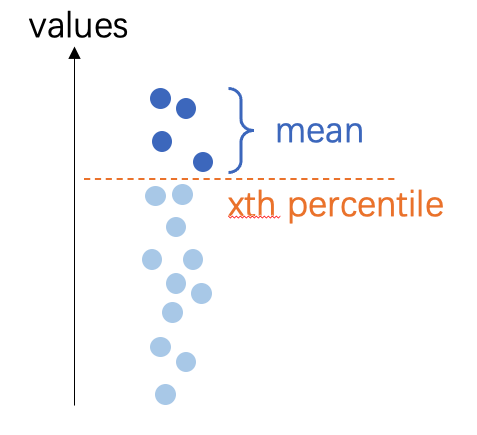
mean: the mean value inside polygonmin: the minimum value inside polygonmax: the maximum value inside polygonpmin5: 5th percentile mean inside polygonpmin10: 10th percentile mean inside polygonpmax5: 95th percentile mean inside polygonpmax10: 90th percentile mean inside polygon
注釈
percentile mean: the mean value of all pixels over/under xth percentile threshold
buffer (float, optional) --
the buffer of ROI, by default 0 (no buffer),0: not using buffer-1: ignore given polygon, using the full dsm to calculate the heightfloat: buffer distance, the unit of buffer follows the DSM coordinates, either pixel or meter.
注釈
If
mode="point", will generate a round buffer polygon first, then extract the z-value by this region, but the return will only be a single point.If
mode="face", will buffer the polygon and then calculate the height inside the buffered polygon
keep_crs (bool, optional) --
When the crs is not the save with DSM crs, where change the ROI crs to fit DSM.
False(default): change ROI's CRS;True: not change ROI's CRS, only attach the z value to current coordinate.
サンプル
Data prepare:
>>> import easyidp as idp
>>> test_data = idp.data.TestData()

>>> roi = idp.ROI(test_data.shp.lotus_shp, name_field=0)
>>> roi = roi[0:3]
>>> lotus_full_dsm = idp.GeoTiff(test_data.pix4d.lotus_dsm)
注意
The ROI and DSM, did not share the same CRS.
The ROI is in longitude-latitude coordinate system, unit is degree.
>>> roi.crs
<Geographic 2D CRS: EPSG:4326>
Name: WGS 84
...

>>> roi
[0]     N1W1
array([[139.54052962,  35.73475194],
       [139.54055106,  35.73475596],
       [139.54055592,  35.73473843],
       [139.54053438,  35.73473446],
       [139.54052962,  35.73475194]])
[1]     N1W2
array([[139.54053488,  35.73473289],
       [139.54055632,  35.73473691],
       [139.54056118,  35.73471937],
       [139.54053963,  35.73471541],
       [139.54053488,  35.73473289]])
[2]     N1W3
array([[139.54054017,  35.73471392],
       [139.54056161,  35.73471794],
       [139.54056647,  35.73470041],
       [139.54054493,  35.73469644],
       [139.54054017,  35.73471392]])
While the DSM (and DOM) are in UTM zone 54N, unit is meter.
>>> lotus_full_dsm.crs
<Derived Projected CRS: EPSG:32654>
Name: WGS 84 / UTM zone 54N
...

>>> >>> lotus_full_dsm.header['tie_point']
[368014.54157, 3955518.2747700005]
Different mode examples
The point mode, each point has its unique z value.
>>> roi_temp = roi.copy()
>>> roi_temp.get_z_from_dsm(lotus_full_dsm, mode="point", kernel="mean", buffer=0, keep_crs=False)

>>> roi_temp
<easyidp ROI> with 3 items
[0]     N1W1
array([[ 368017.7565143 , 3955511.08102276,      97.63990021],
       [ 368019.70190232, 3955511.49811902,      97.67140198],
       [ 368020.11263046, 3955509.54636219,      97.75421143],
       [ 368018.15769062, 3955509.13563382,      97.65288544],
       [ 368017.7565143 , 3955511.08102276,      97.63990021]])
[1]     N1W2
array([[ 368018.20042946, 3955508.96051697,      97.65105438],
       [ 368020.14581791, 3955509.37761334,      97.65817261],
       [ 368020.55654627, 3955507.42585654,      97.63339996],
       [ 368018.601606  , 3955507.01512806,      97.61153412],
       [ 368018.20042946, 3955508.96051697,      97.65105438]])
[2]     N1W3
array([[ 368018.64801755, 3955506.84956301,      97.59950256],
       [ 368020.59340644, 3955507.26665948,      97.64406586],
       [ 368021.00413502, 3955505.31490271,      97.64678192],
       [ 368019.04919431, 3955504.90417413,      97.63285828],
       [ 368018.64801755, 3955506.84956301,      97.59950256]])
The face mode, all points of one ROI share the same z value.
>>> roi_temp = roi.copy()
>>> roi_temp.get_z_from_dsm(lotus_full_dsm, mode="face", kernel="mean", buffer=0, keep_crs=False)

>>> roi_temp
<easyidp ROI> with 3 items
[0]     N1W1
array([[ 368017.7565143 , 3955511.08102276,      97.68352509],
       [ 368019.70190232, 3955511.49811902,      97.68352509],
       [ 368020.11263046, 3955509.54636219,      97.68352509],
       [ 368018.15769062, 3955509.13563382,      97.68352509],
       [ 368017.7565143 , 3955511.08102276,      97.68352509]])
[1]     N1W2
array([[ 368018.20042946, 3955508.96051697,      97.59811401],
       [ 368020.14581791, 3955509.37761334,      97.59811401],
       [ 368020.55654627, 3955507.42585654,      97.59811401],
       [ 368018.601606  , 3955507.01512806,      97.59811401],
       [ 368018.20042946, 3955508.96051697,      97.59811401]])
[2]     N1W3
array([[ 368018.64801755, 3955506.84956301,      97.6997757 ],
       [ 368020.59340644, 3955507.26665948,      97.6997757 ],
       [ 368021.00413502, 3955505.31490271,      97.6997757 ],
       [ 368019.04919431, 3955504.90417413,      97.6997757 ],
       [ 368018.64801755, 3955506.84956301,      97.6997757 ]])
Setting buffer
You can using buffer to calculate z values from a larger area. This will decrease the effects of some extreme noise points on DSM. Especially for the point mode, which is more sensitive to such noise.
注意
The value here share the same unit as DSM, if your DSM in lon-lat coordinate (e.g. WGS84, EPSG:4326),
buffer=1.0will result in 1.0 degree in longitude and latitude, this is a very large area!>>> roi_temp = roi.copy() >>> roi_temp.get_z_from_dsm(lotus_full_dsm, mode="face", kernel="mean", buffer=1.0, keep_crs=False) >>> roi_temp <easyidp ROI> with 3 items [0] N1W1 array([[ 368017.7565143 , 3955511.08102276, 98.30323792], [ 368019.70190232, 3955511.49811902, 98.30323792], [ 368020.11263046, 3955509.54636219, 98.30323792], [ 368018.15769062, 3955509.13563382, 98.30323792], [ 368017.7565143 , 3955511.08102276, 98.30323792]]) [1] N1W2 array([[ 368018.20042946, 3955508.96051697, 97.6088028 ], [ 368020.14581791, 3955509.37761334, 97.6088028 ], [ 368020.55654627, 3955507.42585654, 97.6088028 ], [ 368018.601606 , 3955507.01512806, 97.6088028 ], [ 368018.20042946, 3955508.96051697, 97.6088028 ]]) [2] N1W3 array([[ 368018.64801755, 3955506.84956301, 97.5995636 ], [ 368020.59340644, 3955507.26665948, 97.5995636 ], [ 368021.00413502, 3955505.31490271, 97.5995636 ], [ 368019.04919431, 3955504.90417413, 97.5995636 ],
keep_crs option
If not keep CRS, the ROI x and y values will also change to the same coordinate with DSM.
If do not want the value change, please setting
keep_crs=True>>> roi_temp = roi.copy() >>> roi_temp.get_z_from_dsm(lotus_full_dsm, mode="point", kernel="mean", buffer=0, keep_crs=True) >>> roi_temp <easyidp ROI> with 3 items [0] N1W1 array([[139.54052962, 35.73475194, 97.63990021], [139.54055106, 35.73475596, 97.67140198], [139.54055592, 35.73473843, 97.75421143], [139.54053438, 35.73473446, 97.65288544], [139.54052962, 35.73475194, 97.63990021]]) [1] N1W2 array([[139.54053488, 35.73473289, 97.65105438], [139.54055632, 35.73473691, 97.65817261], [139.54056118, 35.73471937, 97.63339996], [139.54053963, 35.73471541, 97.61153412], [139.54053488, 35.73473289, 97.65105438]]) [2] N1W3 array([[139.54054017, 35.73471392, 97.59950256], [139.54056161, 35.73471794, 97.64406586], [139.54056647, 35.73470041, 97.64678192], [139.54054493, 35.73469644, 97.63285828], [139.54054017, 35.73471392, 97.59950256]])
- get_z_from_pcd(pcd, mode='face', kernel='mean', buffer=0, keep_crs=False)
Get the z values (heights) from PointCloud for 2D polygon
- パラメータ:
pcd (str | <PointCloud> object) -- the path of point cloud, or the PointCloud object from idp.PointCloud()
mode (str, optional) --
the mode to calculate z values, by default "face".
point: get height on each vertex, result in different values for each vertexface: get height on polygon face, result in the same value for each vertex
kernel (str, optional) --
The math kernel to calculate the z value, by default 'mean'
mean: the mean value inside polygonmin: the minimum value inside polygonmax: the maximum value inside polygonpmin5: 5th percentile mean inside polygonpmin10: 10th percentile mean inside polygonpmax5: 95th percentile mean inside polygonpmax10: 90th percentile mean inside polygon
buffer (float, optional) --
the buffer of ROI, by default 0 (no buffer),0: not using buffer-1: ignore given polygon, using the full point cloud to calculate the heightfloat: buffer distance, the unit of buffer follows the PCD coordinates, usually meter.
keep_crs (bool, optional) --
When the crs is not the save with PCD crs, where change the ROI crs to fit PCD.
False(default): change ROI's CRS;True: not change ROI's CRS, only attach the z value to current coordinate.
- is_geo()
Returns True if the ROI is geo coordinate.
- 戻り値の型:
bool
- open(target_path, **kwargs)
An advanced wrapper to open ROI without dealing with file format, current support shapefile.shp and labelme.json
- パラメータ:
target_path (str) -- the path to roi files, current support shapefile.shp and labelme.json
サンプル
Initialize an empty object:
>>> import easyidp as idp
>>> test_data = idp.data.TestData()

>>> roi = idp.ROI()
Then you can open a ROI by:
>>> roi.read_shp(test_data.shp.lotus_shp, name_field=0)

>>> roi.read_labelme_json(test_data.json.labelme_demo)
Or using this short function:
>>> roi.open(test_data.shp.lotus_shp, name_field=0)

>>> roi.open(test_data.json.labelme_demo)
メモ
You can also pass several control parameters in this function, please refer to
read_shp()andread_labelme_json()for more information
- read_geojson(geojson_path, name_field=-1, include_title=False)
read ROI from geojson file
- パラメータ:
geojson_path (str) -- the file path of *.geojson
name_field (str or int or list[ str|int ], optional) -- by default None, the id or name of shp file fields as output dictionary keys
include_title (bool, optional) -- by default False, whether add column name to roi key.
サンプル
>>> import easyidp as idp
>>> test_data = idp.data.TestData()

>>> roi = idp.ROI()
Then you can open a ROI by:
>>> roi.read_geojson(test_data.json.geojson_soy, name_field="FID")
Read geojson [2023_soybean_field.geojson]: 100%|███████████| 260/260         [00:00<00:00, 218234.75it/s]

>>> roi
<easyidp.ROI> with 260 items
[0] 65
array([[-26384.952573, -28870.678514],
       [-26384.269447, -28870.522501],
       [-26385.160022, -28866.622912],
       [-26385.843163, -28866.778928],
       [-26384.952573, -28870.678514]])
[1] 97
array([[-26386.065868, -28865.804036],
       [-26385.382668, -28865.648006],
       [-26386.273244, -28861.748416],
       [-26386.956458, -28861.90445 ],
       [-26386.065868, -28865.804036]])
...
[258]       4
array([[-26404.447166, -28860.770249],
       [-26405.337854, -28856.870669],
       [-26406.020223, -28857.026509],
       [-26405.129644, -28860.926114],
       [-26404.447166, -28860.770249]])
[259]       1
array([[-26393.693576, -28844.979604],
       [-26394.58426 , -28841.08004 ],
       [-26395.26665 , -28841.235885],
       [-26394.375966, -28845.135449],
       [-26393.693576, -28844.979604]])
メモ
For more details of these parameters, please refer to
easyidp.jsonfile.read_geojson()
- read_labelme_json(json_path)
read roi from labelme marked json file
- パラメータ:
json_path (str) -- the path to labelme json file.
サンプル
>>> import easyidp as idp
>>> test_data = idp.data.TestData()
>>> json_path = test_data.json.labelme_demo
PosixPath('/Users/<user>/Library/Application Support/easyidp.data/data_for_tests/json_test/labelme_demo_img.json')

>>> roi = idp.ROI(json_path)
>>> roi
<easyidp.ROI> with 1 items
[0]     1
array([[2447.2392638 , 1369.32515337],
       [2469.93865031, 1628.2208589 ],
       [2730.06134969, 1605.52147239],
       [2703.06748466, 1348.46625767]])
- read_shp(shp_path, shp_proj=None, name_field=-1, include_title=False, encoding='utf-8')
read ROI from shp file
- パラメータ:
shp_path (str) -- the file path of *.shp
shp_proj (str | pyproj object) --
by default None, will read automatically from prj file with the same name of shp filename,or give manually byread_shp(..., shp_proj=pyproj.CRS.from_epsg(4326), ...)orread_shp(..., shp_proj=r'path/to/{shp_name}.prj', ...)name_field (str or int or list[ str|int ], optional) -- by default None, the id or name of shp file fields as output dictionary keys
include_title (bool, optional) -- by default False, whether add column name to roi key.
encoding (str) -- by default 'utf-8', for some chinese characters, 'gbk' may required
サンプル
>>> import easyidp as idp
>>> test_data = idp.data.TestData()

>>> roi = idp.ROI()
Then you can open a ROI by:
>>> roi.read_shp(test_data.shp.lotus_shp, name_field=0)
[shp][proj] Use projection [WGS 84] for loaded shapefile [lotus_plots.shp]
Read shapefile [lotus_plots.shp]: 100%|███████████| 112/112 [00:00<00:00, 2559.70it/s]
>>> roi
<easyidp.ROI> with 112 items
[0]     N1W1
array([[139.54052962,  35.73475194],
       [139.54055106,  35.73475596],
       [139.54055592,  35.73473843],
       [139.54053438,  35.73473446],
       [139.54052962,  35.73475194]])
[1]     N1W2
array([[139.54053488,  35.73473289],
       [139.54055632,  35.73473691],
       [139.54056118,  35.73471937],
       [139.54053963,  35.73471541],
       [139.54053488,  35.73473289]])
...
[110]   S4E6
array([[139.54090456,  35.73453742],
       [139.540926  ,  35.73454144],
       [139.54093086,  35.7345239 ],
       [139.54090932,  35.73451994],
       [139.54090456,  35.73453742]])
[111]   S4E7
array([[139.54090986,  35.73451856],
       [139.54093129,  35.73452258],
       [139.54093616,  35.73450504],
       [139.54091461,  35.73450107],
       [139.54090986,  35.73451856]])
メモ
For more details of these parameters, please refer to
easyidp.shp.read_shp()This method also stores source path in
ROI.sourceand keeps per-feature attributes inROI._attrsfor later save/export.
- rename_by_fields(name_field=-1, include_title=False, fields=None)
Rename ROI keys based on loaded attribute fields.
- パラメータ:
name_field (str or int or list[ str|int ], optional) -- Field selector rule for generating key names.
include_title (bool, optional) -- Whether field title should be included in generated key.
fields (dict, optional) -- Field map in
{"field_name": index}format.
- save(target_path, **kwargs)
Save ROI to file. Format determined by extension.
- パラメータ:
target_path (str | pathlib.Path) -- Output path.
**kwargs (dict) -- Additional arguments passed to specific save methods. For .shp: name_field, encoding, wkt_version.
- save_shp(shp_path, name_field='id', encoding='utf-8', wkt_version=1)
Save ROI polygons to shapefile.
- パラメータ:
shp_path (str | pathlib.Path) -- Output shapefile path (with or without .shp extension).
name_field (str, optional) -- Name of the attribute field for polygon names, by default 'id'. If this field already exists in ROI attrs, it will be overwritten by current ROI key names.
encoding (str, optional) -- Character encoding for the shapefile, by default 'utf-8'.
wkt_version (int, optional) -- WKT version for PRJ output (1 for WKT1_ESRI, 2 for WKT2_2019), by default 1.
- 戻り値:
Path to the saved shapefile.
- 戻り値の型:
pathlib.Path
- 例外:
ValueError -- If ROI is empty.
サンプル
>>> import easyidp as idp
>>> roi = idp.ROI("input.shp")
>>> roi.save_shp("output.shp", name_field='plot_id')
PosixPath('output.shp')
メモ
Uses pyshp for shapefile writing. The .prj file is automatically generated if the ROI has a CRS defined.
If ROI was loaded from shapefile, current
ROI._attrsrows will be written back to DBF during save. Fields not related toname_fieldkeep original values.
- show_shp_field(encoding='utf-8')
Show attributes table of the source shapefile.
- パラメータ:
encoding (str, optional) -- Character encoding used by shapefile DBF, by default
"utf-8".- 例外:
ValueError -- If ROI source is missing or not a
.shpfile path.
- source
the source file path of current ROI.