easyidp.roi.ROI
- class easyidp.roi.ROI(target_path=None, **kwargs)
兴趣区(ROI)对象,可以是2D或3D,通常从shp文件读取。
- __init__(target_path=None, **kwargs)
The method to initialize the ROI class
- 参数:
target_path (str | pathlib.Path, optional) -- ROI文件的路径,通常是shp文件路径,默认值为None
示例
>>> import easyidp as idp
>>> test_data = idp.data.TestData()

>>> roi = idp.ROI(test_data.shp.lotus_shp, name_field=0)
[shp][proj] Use projection [WGS 84] for loaded shapefile [lotus_plots.shp]
Read shapefile [lotus_plots.shp]: 100%|███████████| 112/112 [00:00<00:00, 2559.70it/s]

>>> roi
<easyidp.ROI> with 112 items
[0]     N1W1
array([[139.54052962,  35.73475194],
       [139.54055106,  35.73475596],
       [139.54055592,  35.73473843],
       [139.54053438,  35.73473446],
       [139.54052962,  35.73475194]])
[1]     N1W2
array([[139.54053488,  35.73473289],
       [139.54055632,  35.73473691],
       [139.54056118,  35.73471937],
       [139.54053963,  35.73471541],
       [139.54053488,  35.73473289]])
...
[110]   S4E6
array([[139.54090456,  35.73453742],
       [139.540926  ,  35.73454144],
       [139.54093086,  35.7345239 ],
       [139.54090932,  35.73451994],
       [139.54090456,  35.73453742]])
[111]   S4E7
array([[139.54090986,  35.73451856],
       [139.54093129,  35.73452258],
       [139.54093616,  35.73450504],
       [139.54091461,  35.73450107],
       [139.54090986,  35.73451856]])
Methods
__init__([target_path])The method to initialize the ROI class
back2raw(recons, **kwargs)将多个 GIS 坐标 ROI(多边形)投影到所有图像上
change_crs(target_crs)将ROI的地理坐标更改为另一个CRS。
crop(target[, save_folder])通过给定的 <ROI> 对象,从 GeoTIFF 中裁剪多个具有多边形和多边形名称的 ROI
get_z_from_dsm(dsm[, mode, kernel, buffer, ...])从DSM获取2D多边形的z值(高度)
get_z_from_pcd(pcd[, mode, kernel, buffer, ...])Get the z values (heights) from PointCloud for 2D polygon
is_geo()如果ROI是地理坐标,返回True
open(target_path, **kwargs)一个高级包装器,用于打开ROI而无需处理文件格式,目前支持shapefile.shp和labelme.json
read_labelme_json(json_path)从labelme标记的json文件中读取ROI
read_shp(shp_path[, shp_proj, name_field, ...])从shp文件读取ROI
read_geojson(geojson_path[, name_field, ...])从geojson文件读取ROI
show_shp_field([encoding])Show attributes table of the source shapefile.
save(target_path, **kwargs)Save ROI to file.
save_shp(shp_path[, name_field, encoding, ...])Save ROI polygons to shapefile.
Attributes
- back2raw(recons: Recons, **kwargs)
将多个 GIS 坐标 ROI(多边形)投影到所有图像上
- 参数:
recons (easyidp.reconstruct.Recons) -- the reconstruction object like <easyidp.Metashape> or <easyidp.Pix4D> object (support both)
roi (easyidp.ROI | dict) -- 由easyidp.ROI()或字典创建的<ROI>对象
save_folder (str, optional) -- 用于保存投影预览图像和json文件的文件夹,默认值为""
distortion_correct (bool, optional) --
是否进行畸变校正,默认值为True(返回带镜头畸变的原始图像);如果返回没有镜头畸变的软件校正图像,请将其设置为False。(Pix4D支持此操作,Metashape似乎尚不支持。)ignore (str | None, optional) -- 是否容忍图像外的小部分,详见
easyidp.reconstruct.Sensor.in_img_boundary()。 -None:严格在图像区域内; -x:仅y(垂直)在图像区域内,x可以在图像外; -y:仅x(水平)在图像区域内,y可以在图像外。log (bool, optional) -- 是否打印日志以进行调试,默认值为False
- 返回:
out_dict -- The 2-layer dictionary, the first layer is the roi id, the second layer is the image names contains each roi (
out_dict['roi_id']['image_name'])>>> out_dict = roi.back2raw(...) # find all available images with specified roi (plot), e.g. roi named 'N1W1': >>> one_roi_dict = out_dict['N1W1'] # roi id {'IMG_3457': ..., 'IMG_3458': ..., ...} # find the sepecific roi on specific image, e.g. roi named 'N1W1' on image 'IMG_3457': >>> one_roi_one_img_coord = out_dict["N1W1']['IMG_3457'] array([[ 43.9388228 , 1247.0474214 ], [ 69.04076173, 972.90860296], [ 353.26968458, 993.31308291], [ 328.12327606, 1267.41006845], [ 43.9388228 , 1247.0474214 ]])
小心
建议使用dict.items()进行迭代。
for roi_id, img_dict in out_dict.items():
    # roi_id = 'N1W1'
    # img_dict = out_dict[roi_id]
    for img_name, coords in img_dict.items():
        # img_name = "IMG_3457"
        # coords = out_dict[roi_id][img_name]
        print(coords)
不建议以这种方式使用:
for roi_id in out_dict.keys()
    img_dict = out_dict[roi_id]
    for img_name in img_dict.keys():
        coords = out_dict[roi_id][img_name]
        print(coords)
- 返回类型:
dict
示例
数据准备:
>>> import easyidp as idp
>>> lotus = idp.data.Lotus()

>>> p4d = idp.Pix4D(lotus.pix4d.project, lotus.photo, lotus.pix4d.param)

>>> ms = idp.Metashape(project_path=lotus.metashape.project, chunk_id=0)

>>> roi = idp.ROI(lotus.shp, name_field=0)
>>> roi = roi[0:3]
>>> roi.get_z_from_dsm(lotus.pix4d.dsm)
然后进行反向计算
>>> out_p4d = roi.back2raw(p4d)

>>> out_ms = roi.back2raw(ms)
{'N1W1':
    {'DJI_0479': array([[  43.91987253, 1247.04066872],
                        [  69.0221046 ,  972.89938018],
                        [ 353.25370817,  993.30409359],
                        [ 328.10701394, 1267.40353364],
                        [  43.91987253, 1247.04066872]]),
     'DJI_0480': array([[ 655.3678591 , 1273.01418098],
                        [ 681.18303761,  996.4866665 ],
                        [ 965.60719523, 1019.55346144],
                        [ 939.89408896, 1296.05588162],
                        [ 655.3678591 , 1273.01418098]]),
     'DJI_0481': array([[1024.43757205, 1442.10211955],
                        [1043.51451272, 1159.41597   ],
                        [1331.67724595, 1177.40543929],
                        [1312.55275279, 1460.0493473 ],
                        [1024.43757205, 1442.10211955]]),
     ...
    }

 'N1W2':
    {...}

 ...
参见
easyidp.pix4d.back2raw,easyidp.metashape.back2raw
- change_crs(target_crs)
将ROI的地理坐标更改为另一个CRS。
- 参数:
target_crs (pyproj.CRS) -- 要转换到的CRS。
示例
>>> import easyidp as idp
>>> test_data = idp.data.TestData()
读取使用经纬度CRS(WGS84)的ROI
>>> roi = idp.ROI(test_data.shp.lotus_shp)
[shp][proj] Use projection [WGS 84] for loaded shapefile [lotus_plots.shp]
>>> roi.crs
<Geographic 2D CRS: EPSG:4326>
Name: WGS 84
Axis Info [ellipsoidal]:
- Lat[north]: Geodetic latitude (degree)
- Lon[east]: Geodetic longitude (degree)
Area of Use:
- name: World.
- bounds: (-180.0, -90.0, 180.0, 90.0)
Datum: World Geodetic System 1984 ensemble
- Ellipsoid: WGS 84
- Prime Meridian: Greenwich
检查ROI坐标
>>> roi[0]
array([[139.54052962,  35.73475194],
       [139.54055106,  35.73475596],
       [139.54055592,  35.73473843],
       [139.54053438,  35.73473446],
       [139.54052962,  35.73475194]])
读取具有不同CRS(UTM 54N)的GeoTIFF
>>> dom = idp.GeoTiff(test_data.pix4d.lotus_dom)
>>> target_crs = dom.header["crs"]
>>> target_crs
<Derived Projected CRS: EPSG:32654>
Name: WGS 84 / UTM zone 54N
Axis Info [cartesian]:
- E[east]: Easting (metre)
- N[north]: Northing (metre)
Area of Use:
- name: Between 138°E and 144°E, northern hemisphere between equator and 84°N, onshore and offshore. Japan. Russian Federation.
- bounds: (138.0, 0.0, 144.0, 84.0)
Coordinate Operation:
- name: UTM zone 54N
- method: Transverse Mercator
Datum: World Geodetic System 1984 ensemble
- Ellipsoid: WGS 84
- Prime Meridian: Greenwich
将ROI的CRS(坐标)从WGS84更改为UTM 54N
>>> roi.change_crs(target_crs)
>>> roi.crs
<Derived Projected CRS: EPSG:32654>
Name: WGS 84 / UTM zone 54N
Axis Info [cartesian]:
- E[east]: Easting (metre)
- N[north]: Northing (metre)
Area of Use:
- name: Between 138°E and 144°E, northern hemisphere between equator and 84°N, onshore and offshore. Japan. Russian Federation.
- bounds: (138.0, 0.0, 144.0, 84.0)
Coordinate Operation:
- name: UTM zone 54N
- method: Transverse Mercator
Datum: World Geodetic System 1984 ensemble
- Ellipsoid: WGS 84
- Prime Meridian: Greenwich
检查转换后的坐标值
>>> roi[0]
array([[ 368017.7565143 , 3955511.08102276],
       [ 368019.70190232, 3955511.49811902],
       [ 368020.11263046, 3955509.54636219],
       [ 368018.15769062, 3955509.13563382],
       [ 368017.7565143 , 3955511.08102276]])
- crop(target, save_folder=None, **kwargs)
通过给定的 <ROI> 对象,从 GeoTIFF 中裁剪多个具有多边形和多边形名称的 ROI
- 参数:
target (str | <GeoTiff> object) -- DSM的路径,或从idp.GeoTiff()生成的GeoTiff对象
save_folder (str, optional) -- 保存裁剪图像的文件夹,使用ROI索引作为文件名,默认值为None,表示不保存。
**kwargs (dict) --
Additional arguments passed to the underlying crop method (e.g. GeoTiff.crop_rois):
use_affine (bool): If True, use affine rotation storage for GeoTiff crops.
return_geotiff (bool): If True, return GeoTiff objects instead of ndarrays.
is_geo (bool): Coordinate system flag (usually automated, but can be forced).
- 返回:
键=ID,值=ndarray 数据的字典
- 返回类型:
dict,
示例
数据准备:
>>> import easyidp as idp
>>> test_data = idp.data.TestData()

>>> roi = idp.ROI(test_data.shp.lotus_shp , name_field=0)
>>> roi = roi[0:3]
>>> roi.get_z_from_dsm(lotus_full_dsm, mode="point", kernel="mean", buffer=0, keep_crs=False)
然后裁剪给定的DOM、DSM和点云:
>>> lotus_full_dsm = test_data.pix4d.lotus_dsm
>>> lotus_full_pcd = test_data.pix4d.lotus_pcd
>>> lotus_full_dom = test_data.pix4d.lotus_dom

>>> out_dom = roi.crop(lotus_full_dom)
>>> out_dsm = roi.crop(lotus_full_dsm)
>>> out_pcd = roi.crop(lotus_full_pcd)

>>> out_dsm
{'N1W1':
array([[-10000., -10000., -10000., ..., -10000., -10000., -10000.],
       [-10000., -10000., -10000., ..., -10000., -10000., -10000.],
       [-10000., -10000., -10000., ..., -10000., -10000., -10000.],
       ...,
       [-10000., -10000., -10000., ..., -10000., -10000., -10000.],
       [-10000., -10000., -10000., ..., -10000., -10000., -10000.],
       [-10000., -10000., -10000., ..., -10000., -10000., -10000.]], dtype=float32),
'N1W2':
array([[-10000., -10000., -10000., ..., -10000., -10000., -10000.],
       [-10000., -10000., -10000., ..., -10000., -10000., -10000.],
       [-10000., -10000., -10000., ..., -10000., -10000., -10000.],
       ...,
       [-10000., -10000., -10000., ..., -10000., -10000., -10000.],
       [-10000., -10000., -10000., ..., -10000., -10000., -10000.],
       [-10000., -10000., -10000., ..., -10000., -10000., -10000.]], dtype=float32),
'N1W3':
array([[-10000., -10000., -10000., ..., -10000., -10000., -10000.],
       [-10000., -10000., -10000., ..., -10000., -10000., -10000.],
       [-10000., -10000., -10000., ..., -10000., -10000., -10000.],
       ...,
       [-10000., -10000., -10000., ..., -10000., -10000., -10000.],
       [-10000., -10000., -10000., ..., -10000., -10000., -10000.],
       [-10000., -10000., -10000., ..., -10000., -10000., -10000.]], dtype=float32)}
或者您可以指定``save_folder``参数以自动保存裁剪结果
>>> out_dom = roi.crop(lotus_full_dom, save_folder=r"path/to/save/outputs")
You can also use
use_affine=Trueto get affine rotated crops (GeoTiff only).>>> out_dom = roi.crop(lotus_full_dom, use_affine=True) >>> type(out_dom['N1W1']) <class 'easyidp.geotiff.GeoTiff'>
- crs
当前ROI使用的CRS。
- get_z_from_dsm(dsm, mode='face', kernel='mean', buffer=0, keep_crs=False)
从DSM获取2D多边形的z值(高度)
- 参数:
dsm (str | <GeoTiff> object) -- DSM的路径,或从idp.GeoTiff()生成的GeoTiff对象
mode (str, optional) --
计算z值的模式,默认值为"face"。
point:获取每个顶点的高度,结果是每个顶点的值不同face:获取多边形面的高度,结果是每个顶点的值相同
kernel (str, optional) --
计算z值的数学内核,默认值为'mean'
mean:多边形内的平均值min:多边形内的最小值max:多边形内的最大值pmin5:多边形内第5个*百分位数平均值*pmin10:多边形内第10个*百分位数平均值*pmax5:多边形内第95个*百分位数平均值*pmax10:多边形内第90个*百分位数平均值*
备注
百分位数平均值:所有像素在第x个百分位数阈值以上/以下的平均值
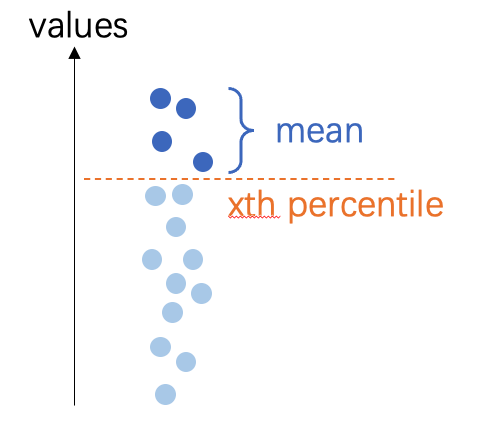
buffer (float, optional) --
ROI的缓冲区,默认值为0(无缓冲区),0:不使用缓冲区-1:忽略给定的多边形,使用整个DSM计算高度float:缓冲距离,缓冲区的单位遵循DSM坐标,可以是像素或米。
备注
如果
mode="point",将首先生成一个圆形缓冲多边形,然后通过该区域提取z值,但返回值将只有一个点。如果
mode="face",将缓冲多边形,然后计算缓冲多边形内的高度
keep_crs (bool, optional) --
当CRS与DSM CRS不同时,将ROI CRS更改为适应DSM。
False(default): change ROI's CRS;True:不更改ROI的CRS,只将z值附加到当前坐标。
示例
数据准备:
>>> import easyidp as idp
>>> test_data = idp.data.TestData()

>>> roi = idp.ROI(test_data.shp.lotus_shp, name_field=0)
>>> roi = roi[0:3]
>>> lotus_full_dsm = idp.GeoTiff(test_data.pix4d.lotus_dsm)
小心
ROI和DSM没有共享相同的CRS。
ROI在经纬度坐标系中,单位为度。
>>> roi.crs
<Geographic 2D CRS: EPSG:4326>
Name: WGS 84
...

>>> roi
[0]     N1W1
array([[139.54052962,  35.73475194],
       [139.54055106,  35.73475596],
       [139.54055592,  35.73473843],
       [139.54053438,  35.73473446],
       [139.54052962,  35.73475194]])
[1]     N1W2
array([[139.54053488,  35.73473289],
       [139.54055632,  35.73473691],
       [139.54056118,  35.73471937],
       [139.54053963,  35.73471541],
       [139.54053488,  35.73473289]])
[2]     N1W3
array([[139.54054017,  35.73471392],
       [139.54056161,  35.73471794],
       [139.54056647,  35.73470041],
       [139.54054493,  35.73469644],
       [139.54054017,  35.73471392]])
而DSM(和DOM)在UTM区54N,单位为米。
>>> lotus_full_dsm.crs
<Derived Projected CRS: EPSG:32654>
Name: WGS 84 / UTM zone 54N
...

>>> >>> lotus_full_dsm.header['tie_point']
[368014.54157, 3955518.2747700005]
不同模式示例
点模式,每个点都有其唯一的z值。
>>> roi_temp = roi.copy()
>>> roi_temp.get_z_from_dsm(lotus_full_dsm, mode="point", kernel="mean", buffer=0, keep_crs=False)

>>> roi_temp
<easyidp ROI> with 3 items
[0]     N1W1
array([[ 368017.7565143 , 3955511.08102276,      97.63990021],
       [ 368019.70190232, 3955511.49811902,      97.67140198],
       [ 368020.11263046, 3955509.54636219,      97.75421143],
       [ 368018.15769062, 3955509.13563382,      97.65288544],
       [ 368017.7565143 , 3955511.08102276,      97.63990021]])
[1]     N1W2
array([[ 368018.20042946, 3955508.96051697,      97.65105438],
       [ 368020.14581791, 3955509.37761334,      97.65817261],
       [ 368020.55654627, 3955507.42585654,      97.63339996],
       [ 368018.601606  , 3955507.01512806,      97.61153412],
       [ 368018.20042946, 3955508.96051697,      97.65105438]])
[2]     N1W3
array([[ 368018.64801755, 3955506.84956301,      97.59950256],
       [ 368020.59340644, 3955507.26665948,      97.64406586],
       [ 368021.00413502, 3955505.31490271,      97.64678192],
       [ 368019.04919431, 3955504.90417413,      97.63285828],
       [ 368018.64801755, 3955506.84956301,      97.59950256]])
面模式,一个ROI的所有点共享相同的z值。
>>> roi_temp = roi.copy()
>>> roi_temp.get_z_from_dsm(lotus_full_dsm, mode="face", kernel="mean", buffer=0, keep_crs=False)

>>> roi_temp
<easyidp ROI> with 3 items
[0]     N1W1
array([[ 368017.7565143 , 3955511.08102276,      97.68352509],
       [ 368019.70190232, 3955511.49811902,      97.68352509],
       [ 368020.11263046, 3955509.54636219,      97.68352509],
       [ 368018.15769062, 3955509.13563382,      97.68352509],
       [ 368017.7565143 , 3955511.08102276,      97.68352509]])
[1]     N1W2
array([[ 368018.20042946, 3955508.96051697,      97.59811401],
       [ 368020.14581791, 3955509.37761334,      97.59811401],
       [ 368020.55654627, 3955507.42585654,      97.59811401],
       [ 368018.601606  , 3955507.01512806,      97.59811401],
       [ 368018.20042946, 3955508.96051697,      97.59811401]])
[2]     N1W3
array([[ 368018.64801755, 3955506.84956301,      97.6997757 ],
       [ 368020.59340644, 3955507.26665948,      97.6997757 ],
       [ 368021.00413502, 3955505.31490271,      97.6997757 ],
       [ 368019.04919431, 3955504.90417413,      97.6997757 ],
       [ 368018.64801755, 3955506.84956301,      97.6997757 ]])
设置缓冲区
您可以使用缓冲区从更大的区域计算z值。这将减少一些极端噪声点对DSM的影响。尤其是对于点模式,它对这种噪声更敏感。
小心
此处的值与DSM共享相同的单位,如果您的DSM在经纬度坐标系中(例如WGS84,EPSG:4326),
buffer=1.0将导致经纬度为1.0度,这是一个非常大的区域!>>> roi_temp = roi.copy() >>> roi_temp.get_z_from_dsm(lotus_full_dsm, mode="face", kernel="mean", buffer=1.0, keep_crs=False) >>> roi_temp <easyidp ROI> with 3 items [0] N1W1 array([[ 368017.7565143 , 3955511.08102276, 98.30323792], [ 368019.70190232, 3955511.49811902, 98.30323792], [ 368020.11263046, 3955509.54636219, 98.30323792], [ 368018.15769062, 3955509.13563382, 98.30323792], [ 368017.7565143 , 3955511.08102276, 98.30323792]]) [1] N1W2 array([[ 368018.20042946, 3955508.96051697, 97.6088028 ], [ 368020.14581791, 3955509.37761334, 97.6088028 ], [ 368020.55654627, 3955507.42585654, 97.6088028 ], [ 368018.601606 , 3955507.01512806, 97.6088028 ], [ 368018.20042946, 3955508.96051697, 97.6088028 ]]) [2] N1W3 array([[ 368018.64801755, 3955506.84956301, 97.5995636 ], [ 368020.59340644, 3955507.26665948, 97.5995636 ], [ 368021.00413502, 3955505.31490271, 97.5995636 ], [ 368019.04919431, 3955504.90417413, 97.5995636 ],
keep_crs选项
如果不保持CRS,ROI的x和y值也将更改为与DSM相同的坐标。
如果不希望值更改,请设置
keep_crs=True>>> roi_temp = roi.copy() >>> roi_temp.get_z_from_dsm(lotus_full_dsm, mode="point", kernel="mean", buffer=0, keep_crs=True) >>> roi_temp <easyidp ROI> with 3 items [0] N1W1 array([[139.54052962, 35.73475194, 97.63990021], [139.54055106, 35.73475596, 97.67140198], [139.54055592, 35.73473843, 97.75421143], [139.54053438, 35.73473446, 97.65288544], [139.54052962, 35.73475194, 97.63990021]]) [1] N1W2 array([[139.54053488, 35.73473289, 97.65105438], [139.54055632, 35.73473691, 97.65817261], [139.54056118, 35.73471937, 97.63339996], [139.54053963, 35.73471541, 97.61153412], [139.54053488, 35.73473289, 97.65105438]]) [2] N1W3 array([[139.54054017, 35.73471392, 97.59950256], [139.54056161, 35.73471794, 97.64406586], [139.54056647, 35.73470041, 97.64678192], [139.54054493, 35.73469644, 97.63285828], [139.54054017, 35.73471392, 97.59950256]])
- get_z_from_pcd(pcd, mode='face', kernel='mean', buffer=0, keep_crs=False)
Get the z values (heights) from PointCloud for 2D polygon
- 参数:
pcd (str | <PointCloud> object) -- the path of point cloud, or the PointCloud object from idp.PointCloud()
mode (str, optional) --
计算z值的模式,默认值为"face"。
point:获取每个顶点的高度,结果是每个顶点的值不同face:获取多边形面的高度,结果是每个顶点的值相同
kernel (str, optional) --
计算z值的数学内核,默认值为'mean'
mean:多边形内的平均值min:多边形内的最小值max:多边形内的最大值pmin5:多边形内第5个*百分位数平均值*pmin10:多边形内第10个*百分位数平均值*pmax5:多边形内第95个*百分位数平均值*pmax10:多边形内第90个*百分位数平均值*
buffer (float, optional) --
ROI的缓冲区,默认值为0(无缓冲区),0:不使用缓冲区-1: ignore given polygon, using the full point cloud to calculate the heightfloat: buffer distance, the unit of buffer follows the PCD coordinates, usually meter.
keep_crs (bool, optional) --
When the crs is not the save with PCD crs, where change the ROI crs to fit PCD.
False(default): change ROI's CRS;True:不更改ROI的CRS,只将z值附加到当前坐标。
- is_geo()
如果ROI是地理坐标,返回True
- 返回类型:
bool
- open(target_path, **kwargs)
一个高级包装器,用于打开ROI而无需处理文件格式,目前支持shapefile.shp和labelme.json
- 参数:
target_path (str) -- ROI文件的路径,目前支持shapefile.shp和labelme.json
示例
初始化一个空对象:
>>> import easyidp as idp
>>> test_data = idp.data.TestData()

>>> roi = idp.ROI()
然后您可以通过以下方式打开ROI:
>>> roi.read_shp(test_data.shp.lotus_shp, name_field=0)

>>> roi.read_labelme_json(test_data.json.labelme_demo)
或者使用此简短函数:
>>> roi.open(test_data.shp.lotus_shp, name_field=0)

>>> roi.open(test_data.json.labelme_demo)
备注
您还可以在此函数中传递几个控制参数,请参阅
read_shp()和read_labelme_json()了解更多信息
- read_geojson(geojson_path, name_field=-1, include_title=False)
从geojson文件读取ROI
- 参数:
geojson_path (str) -- the file path of *.geojson
name_field (str or int or list[ str|int ], optional) -- 默认值为 None,shp 文件字段的 ID 或名称作为输出字典的键
include_title (bool, optional) -- 默认值为 False,是否将列名添加到 roi 键。
示例
>>> import easyidp as idp
>>> test_data = idp.data.TestData()

>>> roi = idp.ROI()
然后您可以通过以下方式打开ROI:
>>> roi.read_geojson(test_data.json.geojson_soy, name_field="FID")
Read geojson [2023_soybean_field.geojson]: 100%|███████████| 260/260         [00:00<00:00, 218234.75it/s]

>>> roi
<easyidp.ROI> with 260 items
[0] 65
array([[-26384.952573, -28870.678514],
       [-26384.269447, -28870.522501],
       [-26385.160022, -28866.622912],
       [-26385.843163, -28866.778928],
       [-26384.952573, -28870.678514]])
[1] 97
array([[-26386.065868, -28865.804036],
       [-26385.382668, -28865.648006],
       [-26386.273244, -28861.748416],
       [-26386.956458, -28861.90445 ],
       [-26386.065868, -28865.804036]])
...
[258]       4
array([[-26404.447166, -28860.770249],
       [-26405.337854, -28856.870669],
       [-26406.020223, -28857.026509],
       [-26405.129644, -28860.926114],
       [-26404.447166, -28860.770249]])
[259]       1
array([[-26393.693576, -28844.979604],
       [-26394.58426 , -28841.08004 ],
       [-26395.26665 , -28841.235885],
       [-26394.375966, -28845.135449],
       [-26393.693576, -28844.979604]])
备注
有关这些参数的更多详细信息,请参阅
easyidp.jsonfile.read_geojson()
- read_labelme_json(json_path)
从labelme标记的json文件中读取ROI
- 参数:
json_path (str) -- labelme json文件的路径。
示例
>>> import easyidp as idp
>>> test_data = idp.data.TestData()
>>> json_path = test_data.json.labelme_demo
PosixPath('/Users/<user>/Library/Application Support/easyidp.data/data_for_tests/json_test/labelme_demo_img.json')

>>> roi = idp.ROI(json_path)
>>> roi
<easyidp.ROI> with 1 items
[0]     1
array([[2447.2392638 , 1369.32515337],
       [2469.93865031, 1628.2208589 ],
       [2730.06134969, 1605.52147239],
       [2703.06748466, 1348.46625767]])
- read_shp(shp_path, shp_proj=None, name_field=-1, include_title=False, encoding='utf-8')
从shp文件读取ROI
- 参数:
shp_path (str) -- shp文件的路径
shp_proj (str | pyproj object) --
默认值为None,将自动从与shp文件名相同的prj文件中读取,或者通过read_shp(..., shp_proj=pyproj.CRS.from_epsg(4326), ...)手动指定,或read_shp(..., shp_proj=r'path/to/{shp_name}.prj', ...)name_field (str or int or list[ str|int ], optional) -- 默认值为 None,shp 文件字段的 ID 或名称作为输出字典的键
include_title (bool, optional) -- 默认值为 False,是否将列名添加到 roi 键。
encoding (str) -- 默认值为'utf-8',对于某些中文字符,可能需要'gbk'
示例
>>> import easyidp as idp
>>> test_data = idp.data.TestData()

>>> roi = idp.ROI()
然后您可以通过以下方式打开ROI:
>>> roi.read_shp(test_data.shp.lotus_shp, name_field=0)
[shp][proj] Use projection [WGS 84] for loaded shapefile [lotus_plots.shp]
Read shapefile [lotus_plots.shp]: 100%|███████████| 112/112 [00:00<00:00, 2559.70it/s]
>>> roi
<easyidp.ROI> with 112 items
[0]     N1W1
array([[139.54052962,  35.73475194],
       [139.54055106,  35.73475596],
       [139.54055592,  35.73473843],
       [139.54053438,  35.73473446],
       [139.54052962,  35.73475194]])
[1]     N1W2
array([[139.54053488,  35.73473289],
       [139.54055632,  35.73473691],
       [139.54056118,  35.73471937],
       [139.54053963,  35.73471541],
       [139.54053488,  35.73473289]])
...
[110]   S4E6
array([[139.54090456,  35.73453742],
       [139.540926  ,  35.73454144],
       [139.54093086,  35.7345239 ],
       [139.54090932,  35.73451994],
       [139.54090456,  35.73453742]])
[111]   S4E7
array([[139.54090986,  35.73451856],
       [139.54093129,  35.73452258],
       [139.54093616,  35.73450504],
       [139.54091461,  35.73450107],
       [139.54090986,  35.73451856]])
备注
有关这些参数的更多详细信息,请参阅
easyidp.shp.read_shp()This method also stores source path in
ROI.sourceand keeps per-feature attributes inROI._attrsfor later save/export.
- rename_by_fields(name_field=-1, include_title=False, fields=None)
Rename ROI keys based on loaded attribute fields.
- 参数:
name_field (str or int or list[ str|int ], optional) -- Field selector rule for generating key names.
include_title (bool, optional) -- Whether field title should be included in generated key.
fields (dict, optional) -- Field map in
{"field_name": index}format.
- save(target_path, **kwargs)
Save ROI to file. Format determined by extension.
- 参数:
target_path (str | pathlib.Path) -- Output path.
**kwargs (dict) -- Additional arguments passed to specific save methods. For .shp: name_field, encoding, wkt_version.
- save_shp(shp_path, name_field='id', encoding='utf-8', wkt_version=1)
Save ROI polygons to shapefile.
- 参数:
shp_path (str | pathlib.Path) -- Output shapefile path (with or without .shp extension).
name_field (str, optional) -- Name of the attribute field for polygon names, by default 'id'. If this field already exists in ROI attrs, it will be overwritten by current ROI key names.
encoding (str, optional) -- Character encoding for the shapefile, by default 'utf-8'.
wkt_version (int, optional) -- WKT version for PRJ output (1 for WKT1_ESRI, 2 for WKT2_2019), by default 1.
- 返回:
Path to the saved shapefile.
- 返回类型:
pathlib.Path
- 抛出:
ValueError -- If ROI is empty.
示例
>>> import easyidp as idp
>>> roi = idp.ROI("input.shp")
>>> roi.save_shp("output.shp", name_field='plot_id')
PosixPath('output.shp')
备注
Uses pyshp for shapefile writing. The .prj file is automatically generated if the ROI has a CRS defined.
If ROI was loaded from shapefile, current
ROI._attrsrows will be written back to DBF during save. Fields not related toname_fieldkeep original values.
- show_shp_field(encoding='utf-8')
Show attributes table of the source shapefile.
- 参数:
encoding (str, optional) -- Character encoding used by shapefile DBF, by default
"utf-8".- 抛出:
ValueError -- If ROI source is missing or not a
.shpfile path.
- source
当前ROI的源文件路径。